Merchant API – Access & Security Specification
Overview
Bridg.Money Merchant APIs use HMAC-SHA256 authentication to ensure request authenticity, payload integrity, replay-attack prevention, and response integrity
End Points
| Environment | Base URL |
| Production | https://api.bridg.money |
| Beta | https://api-beta.bridg.money |
Beneficiaries
Add Beneficiary
Use this API to add a beneficiary to your Bridg.Money account by providing the beneficiary's name, phone number, and bank account details. Only active beneficiaries can receive payouts.
⚠️ If the beneficiary already exists, the API returns 409 with the existing beneficiary's details — no duplicate is created. Use the returned beneficiaryId to initiate payouts.
Body
application/jsonBeneficiary name. Max 100 characters; letters, numbers, spaces, and common special characters allowed.
sample - Ravi Traders Pvt Ltd
Valid email address (optional).
sample - ravi@merchant.com
Beneficiary mobile number (valid Indian mobile number).
sample - 9876543210
Bank account number (9–18 digits). Must be unique for active beneficiaries under the same business.
sample - 0002053000010425
Bank IFSC (11 characters. Format: AAAA0XXXXXX).
sample - UTIB0000123
Response
application/json{
"status": 200,
"data": {
"beneficiaryId": "123e4567-e89b-12d3-a456-426614174000",
"beneficiaryCode": "BEN000123"
},
"message": "Beneficiary created successfully",
"meta": null
}{
"status": 409,
"data": {
"beneficiaryId": "50a97363-71bb-47b1-af7f-a55444684a58",
"name": "Test User",
"email": "test@example.com",
"phoneNumber": "9876543210",
"accountNumber": "123456789012",
"ifsc": "HDFC0001234"
},
"message": "Beneficiary already exists",
"meta": null
}{
"status": 400,
"data": null,
"message": "Failed to add beneficiary",
"meta": null
}{
"status": 401,
"data": null,
"message": "Missing API authentication headers",
"meta": null
}{
"status": 500,
"data": null,
"message": "Something went wrong",
"meta": null
}Delete Beneficiary
This operation performs a soft delete by setting the beneficiary status to Inactive (0). Inactive beneficiaries cannot receive payouts, but historical payout records remain preserved.
Path Parameters
Unique ID of the beneficiary to deactivate.
sample - 123e4567-e89b-12d3-a456-426614174000
Response
application/json{
"status": 200,
"data": {
"beneficiaryId": "123e4567-e89b-12d3-a456-426614174000",
"status": 0
},
"message": "Beneficiary deleted successfully",
"meta": null
}{
"status": 404,
"data": null,
"message": "Beneficiary not found",
"meta": null
}{
"status": 401,
"data": null,
"message": "Missing API authentication headers",
"meta": null
}{
"status": 500,
"data": null,
"message": "Internal server error",
"meta": null
}Payouts
Initiate Payout Transaction
Initiates a payout transfer to a beneficiary. Wallet balance is validated and debited during processing.
Processing Flow:
• Step 1: Payout record created in database
• Step 2: Wallet validation and debit
• Step 3: Webhook triggered (if configured)
• Step 4: Bank transfer initiated
• Step 5: Final status persisted
⚠️ The 200 response confirms the payout was accepted for processing (status 4 — InProgress). Final status must be verified using the Get Payout API.
Body
application/jsonBeneficiary unique identifier (UUID). Beneficiary must exist, be active, and belong to the authenticated business.
sample - 123e4567-e89b-12d3-a456-426614174001
Payout amount as a string with exact decimal format (e.g., "1000.00"). Must match configured decimal precision and business limits.
sample - 1000.00
Transaction mode. Allowed values: I (IMPS), N (NEFT), R (RTGS), S (SELF). Must match business configuration.
sample - N
Response
application/json{
"status": 200,
"data": {
"payoutTransactionId": "ca4bac52-2800-11f1-8a8e-0a0c26167b3f",
"transactionId": "BMPT2026032500001",
"amount": 100,
"status": 4,
"commissionAmount": 0.75,
"commissionGSTAmount": 0.14
},
"message": "Payout initiated and is being processed",
"meta": null
}{
"status": 500,
"data": {
"payoutTransactionId": "ca4bac52-2800-11f1-8a8e-0a0c26167b3f",
"transactionId": "BMPT2026032500001",
"amount": 100,
"status": 12,
"commissionAmount": 0.75,
"commissionGSTAmount": 0.14
},
"message": "Payout failed",
"meta": null
}{
"status": 400,
"data": null,
"message": "Failed to initiate payout",
"meta": null
}{
"status": 401,
"data": null,
"message": "Missing API authentication headers",
"meta": null
}Transaction Types
- I – IMPS
- N – NEFT
- R – RTGS
- S – SELF
Payout Status Codes
| Code | Status |
|---|---|
| 2 | Initiated |
| 4 | InProgress |
| 3 | Pending |
| 11 | Successful |
| 12 | Failed |
Payout Transaction
Fetches complete payout transaction details including beneficiary information, bank reference, commission breakdown, and current payout status.
Path Parameters
Unique payout transaction identifier (UUID).
sample - ca4bac52-2800-11f1-8a8e-0a0c26167b3f
Response
application/json{
"status": 200,
"data": [
{
"payoutTransactionId": "ca4bac52-2800-11f1-8a8e-0a0c26167b3f",
"transactionId": "BMPT2026032500001",
"businessId": "123e4567-e89b-12d3-a456-426614174000",
"merchantId": "123e4567-e89b-12d3-a456-426614174999",
"vendorId": "123e4567-e89b-12d3-a456-426614174001",
"vendorCode": "VEND001",
"name": "Ravi Traders",
"ifsc": "HDFC0001234",
"accountNumber": "123456789012",
"transactionType": "N",
"transactionTypeName": "NEFT",
"amount": 1000,
"commissionAmount": 0.75,
"commissionGSTAmount": 0.14,
"status": 11,
"responseCode": "100",
"responseMessage": "Transfer completed",
"transactionReference": "BANKREF12345",
"createdDate": "2026-03-25T10:30:00Z",
"updatedDate": "2026-03-25T10:31:00Z"
}
],
"message": null,
"meta": null
}{
"status": 404,
"data": null,
"message": "Data does not exist",
"meta": null
}{
"status": 400,
"data": null,
"message": "Server error",
"meta": null
}{
"status": 401,
"data": null,
"message": "Missing API authentication headers",
"meta": null
}- Response returns an array containing the payout record.
- The
statusfield is a numeric code. See the status code table in the Initiate Payout section for reference. - If no record is found, the API may return an empty array unless 404 mode is explicitly enabled.
Postman Collection
Use the official Postman collection to quickly test and integrate Bridg.Money Payout APIs.
Postman Setup Instructions
- Set base_url in environment Variables.
- Set api_key in environment Variables.
- Set api_secret in environment Variables.
- All request URLs use {{base_url}}

Payout API Call with Signature
Important
- Delimiter must be pipe (|)
- Method must be uppercase
- Timestamp must be in milliseconds
- Sign the exact JSON string sent in the request
- HMAC algorithm: SHA256 (hex output)
/**
 * Initiate Payout - Bridg.Money API
 * Canonical format:
 * METHOD | PATH | TIMESTAMP | BODY
 */

import axios from "axios";
import crypto from "crypto";

const API_KEY = "YOUR_API_KEY";
const API_SECRET = "YOUR_API_SECRET";

async function initiatePayout() {
  const method = "POST";
  const path = "/v1/payouts";
  const baseUrl = "https://api-beta.bridg.money";

  const body = {
    beneficiaryId: "f81d4fae-7dec-11d0-a765-00a0c91e6bf6",
    amount: "100.00",
    transactionType: "I"
  };

  const timestamp = Date.now().toString();
  const payload = JSON.stringify(body);

  const canonical = [
    method.toUpperCase(),
    path,
    timestamp,
    payload
  ].join("|");

  const signature = crypto
    .createHmac("sha256", API_SECRET)
    .update(canonical)
    .digest("hex");

  const response = await axios.post(
    baseUrl + path,
    body,
    {
      headers: {
        "Content-Type": "application/json",
        "x-api-key": API_KEY,
        "x-timestamp": timestamp,
        "x-signature": signature
      }
    }
  );

  console.log(response.data);
}

initiatePayout();
Payout Testing Accounts
SELF BANK TESTING
Beneficiary Account Number: 0002053000010425
Account Name: BEENA DENNY
NEFT / OTHER BANK TESTING
Beneficiary Account Number: 0574050000000449
Beneficiary IFSC: CSBK0000237
IMPS / OTHER BANK TESTING
Beneficiary Account Number: 123456041
Beneficiary IFSC: UTIB0000119
Authentication Headers
| Headers | Description |
| x-api-key | Public API key |
| x-timestamp | Unix epoch milliseconds as string (Date.now().toString()) |
| x-signature | HMAC-SHA256 signature |
Timestamp Rules
- Format: Unix epoch milliseconds string
- Validity: ±5 minutes
Canonical Request Format
METHOD | PATH | TIMESTAMP | BODY
Signature Algorithm
HMAC-SHA256 with hex encoding
Generate Request Signature
Canonical Request Format
METHOD | PATH | TIMESTAMP | BODY
• Delimiter must be pipe (|) • Timestamp must be in milliseconds • GET/DELETE/HEAD/OPTIONS must have empty body • Signature algorithm: HMAC-SHA256 (hex)
/**
 * Generates HMAC-SHA256 signature for Bridg.Money API
 * Canonical format:
 * METHOD | PATH | TIMESTAMP | BODY
 */

import crypto from "crypto";

export function generateApiSignature({
  method,
  path,
  body,
  apiSecret,
}) {
  const timestamp = Date.now().toString();

  const canonicalBody =
    ["GET", "DELETE", "HEAD", "OPTIONS"].includes(method.toUpperCase())
      ? ""
      : body
        ? JSON.stringify(body)
        : "";

  const canonicalString = [
    method.toUpperCase(),
    path,
    timestamp,
    canonicalBody,
  ].join("|");

  const signature = crypto
    .createHmac("sha256", apiSecret)
    .update(canonicalString)
    .digest("hex");

  return { timestamp, signature };
}
Verify Response Signature
Response Signature Verification
TIMESTAMP | RAW_RESPONSE_STRING
• Delimiter must be pipe (|)
• Use the exact raw response body (do NOT re-stringify JSON)
• Signature algorithm: HMAC-SHA256 (hex)
• Use constant-time comparison
/**
 * Verifies response signature from Bridg.Money API
 * Canonical format:
 * TIMESTAMP | RAW_RESPONSE_STRING
 */

import crypto from "crypto";

export function verifyResponseSignature({
  timestamp,
  rawBody, // MUST be raw response string
  signature,
  apiSecret,
}) {
  const canonicalString = [
    timestamp,
    rawBody
  ].join("|");

  const expectedSignature = crypto
    .createHmac("sha256", apiSecret)
    .update(canonicalString)
    .digest("hex");

  const sigBuf = Buffer.from(signature, "hex");
  const expBuf = Buffer.from(expectedSignature, "hex");

  if (sigBuf.length !== expBuf.length) return false;

  return crypto.timingSafeEqual(sigBuf, expBuf);
}
IP Whitelisting
Follow the instructions below to configure IP whitelisting:
- Log in to your dashboard using your credentials.
- Navigate to Settings > IP Whitelist.
- You will see the IP Whitelisting page with no IPs added.
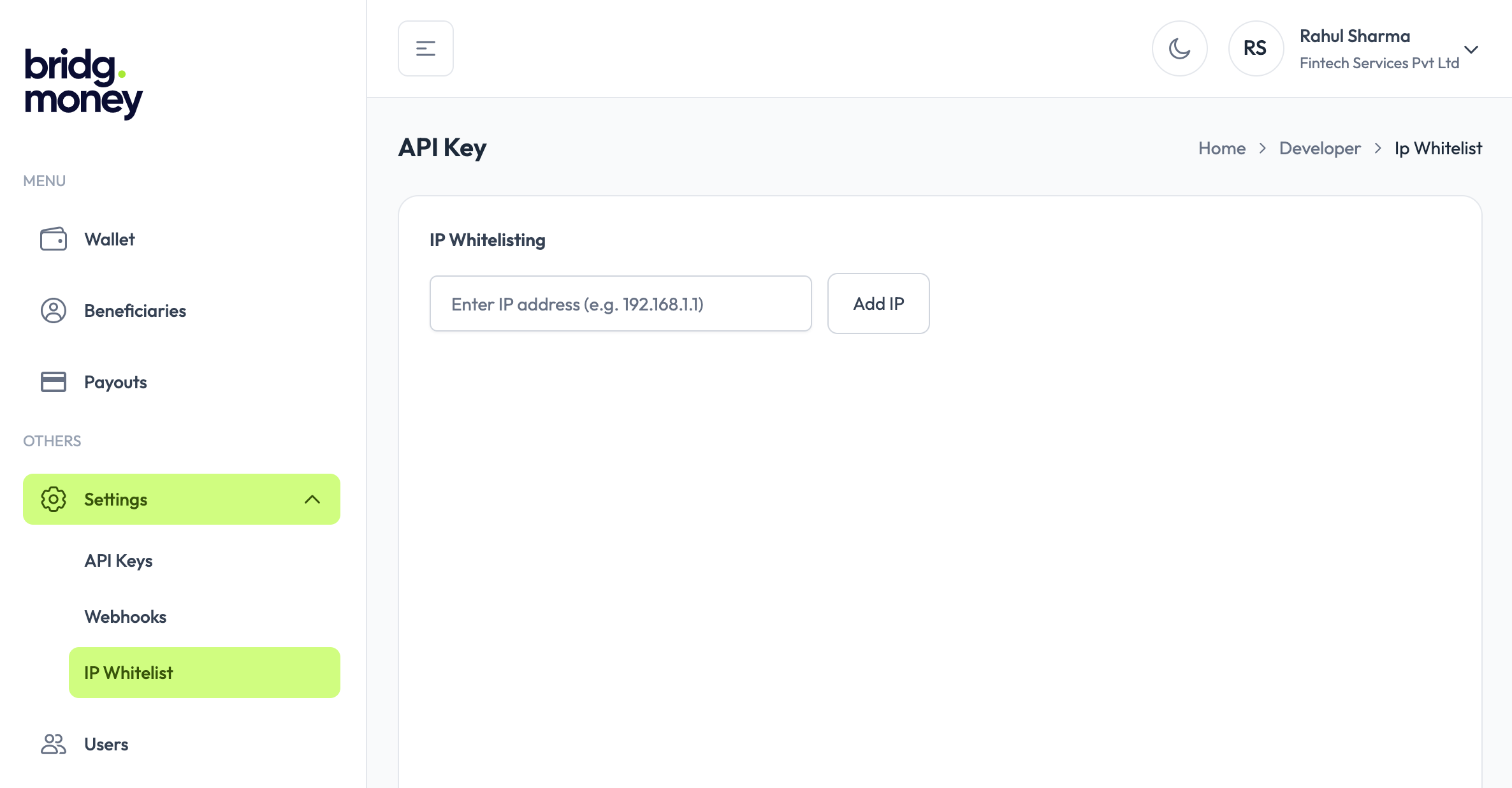
- IP: Enter the IP address from which you want to allow API access.
- Click Add IP to whitelist the entered IP address.
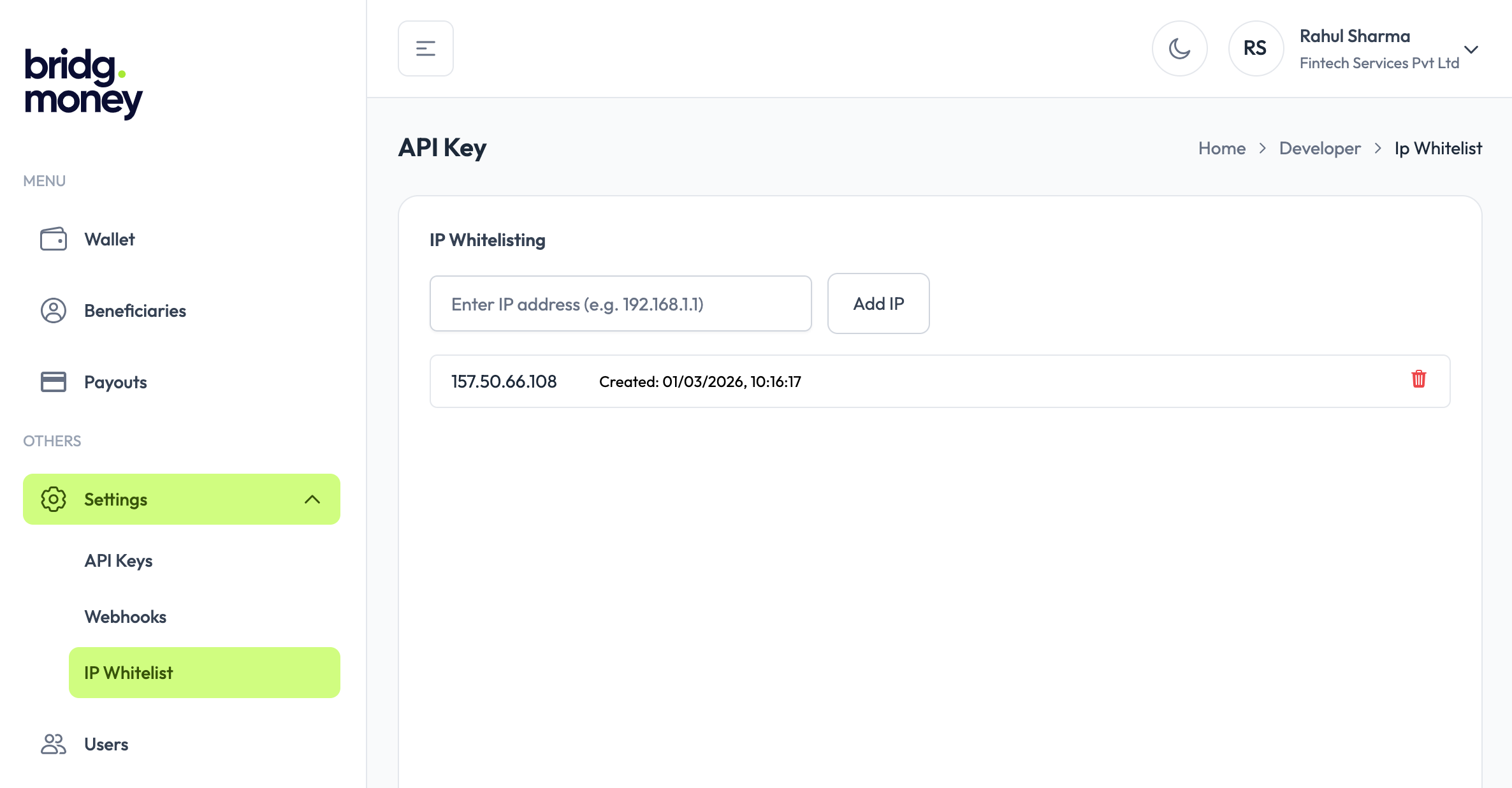
Once IP addresses are added to the whitelist, only requests originating from these IPs will be allowed to access your APIs. This helps ensure that only trusted systems can interact with your account, reducing the risk of unauthorized access. You can add or remove whitelisted IPs at any time, giving you full control over API access.
Response Signing
Responses include:
x-response-timestamp
x-response-signature
Canonical Response Format
STATUS | PATH | RESPONSE_TIMESTAMP | RESPONSE_BODY
Error Codes
| Code | Description |
| 200 | Request successful |
| 400 | Invalid request format or malformed signature |
| 401 | Missing authentication headers or request expired |
| 403 | Invalid API key, signature, or IP not whitelisted |
| 500 | Internal server error |
Webhook
Webhooks allow your application to receive real-time updates about payout status changes.
Webhook Payload
{
  "payoutWebhookId": "1ee3be28-0330-48eb-b89c-8290413c81f8",
  "event": "Successful",
  "data": {
    "status": 11,
    "timestamp": "2026-03-04 17:05:15.000000",
    "businessId": "1b313206-049a-11f1-8a8e-0a0c26167b3f",
    "responseCode": "100",
    "transactionId": "BMPT2026030400007",
    "responseMessage": "Operation Success",
    "payoutTransactionId": "45e254c0-17ec-11f1-8a8e-0a0c26167b3f"
  }
}
Webhook Event Types
| Event | Status Code | Description |
|---|---|---|
| Initiated | 3 | The payout request has been created and submitted for processing. |
| Successful | 11 | The payout has been processed successfully and funds were transferred. |
| Failed | 12 | The payout failed during processing. |
Webhook Headers
- x-webhook-timestamp — Unix timestamp in milliseconds when the webhook was sent
- x-webhook-signature — HMAC-SHA256 hex signature for verifying authenticity
- x-webhook-alg (sha256)
Signature Verification
Canonical String
TIMESTAMP|RAW_REQUEST_BODY
Use the exact raw request body received by your server — do not parse or re-serialize it. Any change to whitespace or key ordering will cause verification to fail.
Webhooks older than 5 minutes will be rejected to prevent replay attacks. Ensure your server clock is in sync (NTP).
import crypto from "crypto";

export function verifyWebhookSignature({
  timestamp,
  rawBody,
  signature,
  apiSecret,
}) {

  const tolerance = 5 * 60 * 1000;
  const diff = Math.abs(Date.now() - Number(timestamp));

  if (diff > tolerance) {
    throw new Error("Webhook timestamp expired");
  }

  const canonical = `${timestamp}|${rawBody}`;

  const expectedSignature = crypto
    .createHmac("sha256", apiSecret)
    .update(canonical)
    .digest("hex");

  return expectedSignature === signature;
}
Receiving Webhooks
The following examples show how to capture the raw request body and verify the signature in your webhook endpoint. Always respond with 200 immediately and process the event asynchronously to avoid timeouts.
// Express.js — capture raw body before parsing
app.use(express.json({
  verify: (req, res, buf) => {
    req.rawBody = buf.toString();
  },
}));

app.post("/webhook", (req, res) => {
  const timestamp = req.headers["x-webhook-timestamp"];
  const signature = req.headers["x-webhook-signature"];
  const rawBody = req.rawBody; // use this — not JSON.stringify(req.body)

  const isValid = verifyWebhookSignature({
    timestamp,
    rawBody,
    signature,
    apiSecret: process.env.API_SECRET,
  });

  if (!isValid) {
    return res.status(401).json({ error: "Invalid signature" });
  }

  // respond immediately, process async
  res.status(200).json({ received: true });

  const { event, data } = req.body;
  processWebhookEvent(event, data);
});
Best Practices
- Always verify the signature before processing any webhook event.
- Respond with HTTP 200 immediately. If your endpoint takes too long, the webhook will be marked as failed. Process the event asynchronously after responding.
- Store your webhook secret securely using environment variables — never hardcode it in your source code.
- Handle duplicate events. Use
payoutWebhookIdto deduplicate in case the same webhook is delivered more than once. - Keep your server clock synced using NTP. Webhooks older than 5 minutes are rejected.
Version
- API Security Spec: v1.1
- Last Updated:March 2026